Viggle Fleet
During my time at Viggle, I had the opprounity to build out the infrastructure which supports all of our multiplayer games. I decided to call it Viggle Fleet!A lot of our games are multiplayer, which meant we needed a central server for all players to connect to. On top of that, I wanted to make the system controllable through a gui and automate as much as possible. Since I was working with the Viggle AWS account, this required a lot of caution (previous employee had leaked a api key leading to 100k+ in losses, so I was required to make everything)
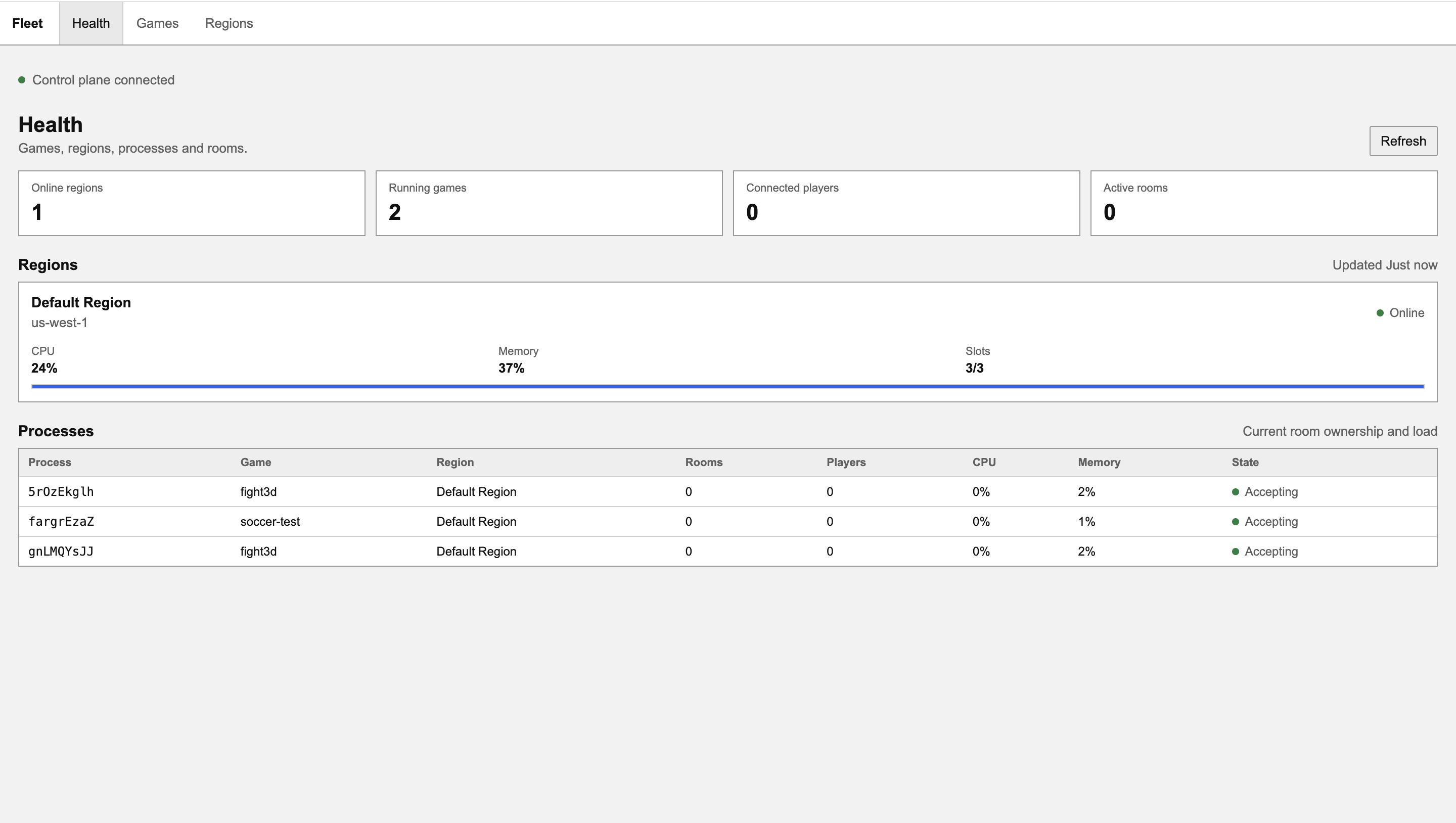
The dashboard
High level architecture
I took some inspiration from designing my MMO, using a distributed architecture with a single "gateway" node controlling the rest.This gateway node would also be the steering wheel for the maintainers of this system, hosting a dashboard which can control some attributes of our servers.
I explicitly got a key with ONLY read access to viggle games eks, and thus was pretty free with giving all the servers this key. Gateway got the latest images on boot, and told the game servers which games they should be hosting (with ids so the servers can pull from eks directly)
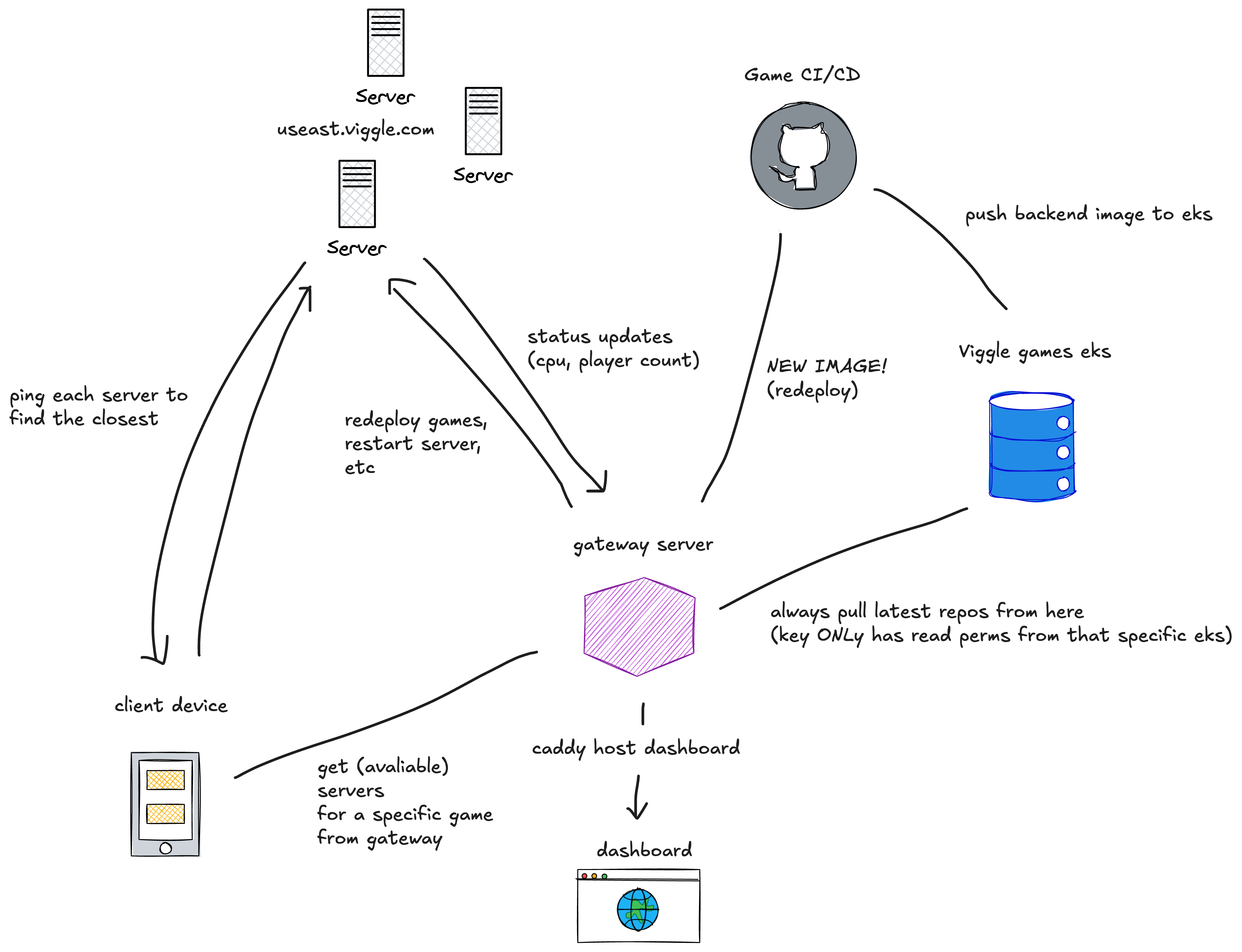 Some design notes which might at first seem uninuitive:
- Pinging servers: Why can't we just use DNS routing to the nearest server? Well we only want to advertise servers which aren't under extreme load as "joinable", since adding more players past ~500 per server for some games resulted in visible lag. While we could do something like GeoDNS + some workaround to filter full servers, DNS caching would eat our lunch! Trust me I tried this first.
- Dashboard connected to gateway: Why connect the dashboard directly to the gateway? This coupling is intentional. I wanted to make the game-hosting server logic/api as decoupled as possible from anything outside of its hosting purpose. Since the gateway and game servers already poll from one another for workload/diagnostics, it is elegant to simply display the exact same diagnostics on the dashboard in a simple html file.
- Dashboard auth I didn't include it here but to use the dashboard you need to input a JWT token which is verified by our main Viggle backend. Dont worry no leaks.
- No k8s: Why no kubernetes?? Because the footprint of this project needed to be TINY! Per request from my boss. In this project making servers was very manual (manually authenticating them with minimal AWS roles, then manually connecting them to the gateway node) but after that it was full auto with no permissions other then reading from my OWN game eks (so essentially no permissions). Letting a dashboard interact with a EKS service which has the power to create containers on the other hand was simply not a nessecary risk.
Game deployment
Something I quickly realized was no all games were equal: some games had 90% of their userbase from China, other games had 90% of their userbase from India, so it didn't make sense to have the servers auto boot the same games.Solution:
Instead of booting the same games, I made game proccess allocation assignable in the dashboard, and have the gateway be the authoritative blueprint for which games run on which servers. This led to a way better user experience, as now Chinese players who previously were forced to play on Australia servers could all play in the Asia server (by allocating all processes to serving Fight3D, our flagship game).